RAM vs. ROM: The Core of Your Computer’s Memory Guide
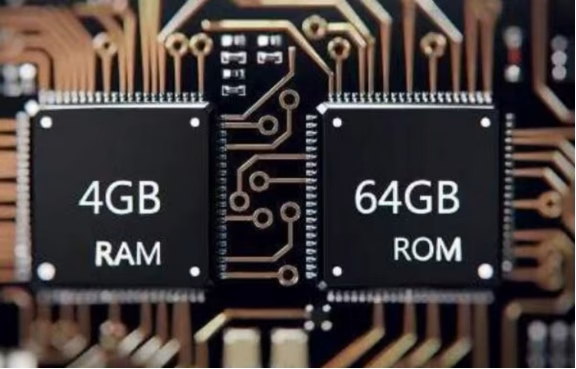
Table of Contents
1. The Foundation of Digital Memory

In the vast landscape of computing, memory is the unsung hero, constantly working behind the scenes to store and retrieve the data that powers our digital lives. From browsing the web to running complex software, every action relies on a sophisticated system of data storage. When we talk about “computer memory”, we’re often thinking about two fundamental types: Random Access Memory (RAM) and Read-Only Memory (ROM). While both are crucial components, they serve distinct purposes, operate differently, and profoundly impact your device’s overall performance and functionality.
Understanding the core differences between RAM and ROM is essential for anyone looking to grasp how computers truly work. These aren’t just technical jargon; they represent two pillars of your system’s architecture, each playing a critical role in everything from the moment you press the power button to the smooth execution of your favorite applications. This article will delve into what makes each memory type unique, how they interact, and why appreciating their individual characteristics can unlock a deeper understanding of your device.
2. Understanding RAM: The Brain’s Workspace

Random Access Memory, or RAM, is often described as your computer’s short-term memory or its active “workspace”. It’s where your operating system, applications, and current data are stored for quick access by the Central Processing Unit (CPU). The defining characteristic of RAM is its volatility: once the power is turned off, all the data stored in RAM is lost. This temporary nature is by design, allowing RAM to be constantly overwritten with new information as you switch between tasks.
Think of RAM as a workbench where all the tools and materials you’re currently using are laid out. The bigger the workbench (more RAM), the more items you can have readily available, allowing for faster multitasking and smoother performance. When you open an application, load a web page, or edit a document, your computer temporarily loads the necessary data into RAM. This allows the CPU to access it almost instantly, significantly faster than retrieving data from slower storage devices like a hard drive or Solid State Drive (SSD).
Types of RAM
- Dynamic RAM (DRAM):This is the most common type of RAM found in personal computers and servers. DRAM stores each bit of data in a separate capacitor within an integrated circuit. Since capacitors naturally leak charge, DRAM requires constant refreshing (hence “dynamic”) to maintain the data. While cheaper and more power-efficient than SRAM, it is also slower.

- Static RAM (SRAM):Unlike DRAM, SRAM uses transistors and does not require constant refreshing to retain data, making it faster and more expensive. SRAM is typically used for CPU caches (L1, L2, L3 cache) where speed is paramount, and smaller capacities are sufficient.
The amount of RAM a computer has directly impacts its ability to handle multiple programs simultaneously and run memory-intensive applications efficiently. More RAM generally translates to a snappier and more responsive user experience, reducing frustrating slowdowns and crashes.
3. Exploring ROM: The System’s Immutable Instructions

In contrast to RAM, Read-Only Memory (ROM) is a type of non-volatile memory. This means that the data stored in ROM remains intact even when the power is turned off. ROM contains permanent, essential instructions that your computer needs to start up and operate. It’s like the instruction manual hardwired into your device, telling it how to perform fundamental tasks before the operating system even loads.
The primary function of ROM is to store the firmware, such as the Basic Input/Output System (BIOS) or Unified Extensible Firmware Interface (UEFI). These programs are responsible for the initial boot-up process, performing critical hardware checks (known as Power-On Self-Test or POST), and then locating and loading the operating system from a storage drive into RAM. Without ROM, your computer wouldn’t know how to begin its start-up sequence.
Types of ROM
- PROM (Programmable Read-Only Memory): This type of ROM can be programmed once by the user, usually with a special device called a PROM programmer. Onceprogrammed, the data cannot be erased or modified.
- EPROM (Erasable Programmable Read-Only Memory):EPROM can be erased by exposing it to strong ultraviolet light, allowing it to be reprogrammed. This made it more flexible than PROM, especially during development phases.
- EEPROM (Electrically Erasable Programmable Read-Only Memory):EEPROM can be erased and reprogrammed electrically, without needing to remove the chip or use UV light. This offers even greater flexibility and is often used for storing configuration data that might need occasional updates, such as in solid-state drives or for updating BIOS settings.
- Flash Memory:A more advanced form of EEPROM, flash memory allows large blocks of data to be erased and rewritten quickly. It is widely used in USB drives, SSDs, and mobile devices due to its high density, speed, and non-volatility.
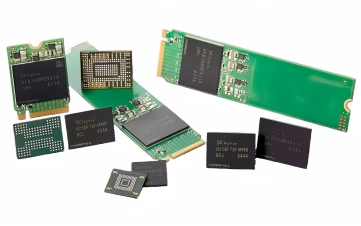
While the name “Read-Only” suggests that data cannot be altered, modern ROM types like EEPROM and flash memory do allow for limited reprogramming, primarily for firmware updates. However, this process is usually more involved and less frequent than the continuous read/write operations of RAM.
4. RAM vs. ROM: A Head-to-Head Comparison
To summarize the fundamental differences between these two crucial components, let’s look at a direct comparison:
| Feature | Random Access Memory (RAM) | Read-Only Memory (ROM) |
| Volatility | Volatile; data is lost when power is off. | Non-volatile; data is retained even when power is off. |
| Function | Temporary storage for actively running programs and data. Used for real-time operations. | Permanent storage for firmware (BIOS/UEFI), boot-up instructions, and diagnostics. |
| Read/Write Capability | Can be read from and written to continuously and quickly. | Primarily read-only; modern types (EEPROM, Flash) can be erased and rewritten but with limitations. |
| Speed | Much faster access speeds (nanoseconds). | Slower access speeds than RAM. |
| Capacity | Measured in gigabytes (GB); typically 4GB to 128GB+ in modern systems. | Measured in megabytes (MB) or even kilobytes (KB) for basic firmware; typically a few MBs. |
| Cost | More expensive per gigabyte than permanent secondary storage but crucial for performance. | Relatively inexpensive for its specific function. |
| Location | Installed on motherboard as memory modules (DIMMs/SODIMMs). | Integrated directly onto the motherboard or as a dedicated chip. |
| Types | DRAM (Dynamic RAM), SRAM (Static RAM). | PROM, EPROM, EE PROM, Flash Memory. |
| Impact on User | Directly affects multitasking, application performance, and overall system responsiveness. | Ensures the computer can start up and perform basic functions; rarely directly interacted with by the user. |
5. Impact on Performance and Functionality
The interplay between RAM and ROM is fundamental to how a computer operates. ROM provides the initial spark, giving the system its first instructions to wake up and perform a Power-On Self-Test (POST) and locate the operating system. Once the operating system loads, RAM takes over as the primary workspace, allowing the CPU to efficiently execute applications and manage user data. The amount and speed of RAM directly influence your computer’s ability to handle multiple programs simultaneously, render complex graphics, or process large datasets without slowing down. More RAM means less reliance on slower virtual memory (swapping data to a storage drive), leading to a much smoother user experience.
While ROM’s role isn’t about speed or capacity in the same way RAM’s is, its integrity is paramount. If the firmware stored in ROM becomes corrupted, the computer may fail to boot entirely, rendering it unusable. Modern ROM (specifically flash memory, a type of EEPROM) also plays a critical role in storing the firmware for various other components like graphics cards, hard drives, and even peripherals, ensuring their proper initialisation and function within the system. Both RAM and ROM are integral parts of the computer’s primary memory, directly interacting with the CPU for critical operations.
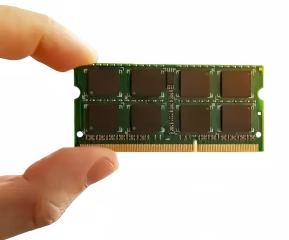
Understanding these distinct roles highlights why a balanced system requires adequate consideration for both memory types. You wouldn’t want a massive RAM capacity if your ROM couldn’t even tell your computer how to turn on. Conversely, an outdated ROM won’t hinder performance during routine tasks, but insufficient RAM will bottleneck even the most powerful processor. Together, they form a symbiotic relationship that ensures your computer is not only functional but also performant.
6. RAM and ROM FAQs
Generally, no. ROM is typically integrated into the motherboard or specific components and is not designed for user upgrades. While firmware (stored on ROM) can sometimes be updated, this is different from replacing the physical ROM chip, which is usually not feasible for an end-user.
Yes, to a certain extent. More RAM allows your computer to run more applications simultaneously and handle larger files without slowing down, reducing the need to use slower virtual memory. However, there’s a point of diminishing returns; after a certain amount (e.g., 16GB for most users), other components like the CPU or SSD might become the bottleneck.
If the ROM containing your BIOS/UEFI firmware is corrupted, your computer may fail to boot up entirely. You might see error messages, hear beep codes, or the system might not display anything on the screen. In some cases, a BIOS recovery process can fix it, but often it requires professional repair or motherboard replacement.
Flash memory is a type of non-volatile memory, making it more akin to ROM in its data retention characteristics. However, unlike traditional ROM, flash memory can be easily erased and rewritten, making it versatile for both permanent data storage (like in SSDs) and storing firmware that requires updates (like BIOS/UEFI on modern motherboards). It blurs the lines, but fundamentally it’s a form of re-writable ROM.
RAM is significantly faster than ROM. RAM is designed for quick, constant read and write operations for active data, whereas ROM is optimized for data retention and is typically only read from (or written to infrequently for updates).
They serve distinct, complementary purposes. ROM provides the essential, permanent instructions needed to start the computer (boot firmware), while RAM acts as the temporary, high-speed workspace for running programs and active data. Both are indispensable for a functional computer system.
7. Summary
In essence, RAM and ROM are the yin and yang of computer memory, each indispensable for a functioning system. RAM provides the dynamic, high-speed temporary data storage necessary for active operations, making your computer fast and responsive. Its volatile nature ensures a clean slate for new tasks. ROM, on the other hand, offers stable, non-volatile permanent storage for the critical boot-up instructions and firmware that give your computer its initial intelligence. While RAM dictates your day-to-day user experience, ROM lays the essential foundation upon which that experience is built. Understanding these core components not only demystifies your computer but also empowers you to make more informed decisions about upgrades and system maintenance.
Contact us
WhatsApp: +86-13570802455
Wechat: +86-13570802455
Email: [email protected]